Choosing a Game Engine in the AI Era: Commercial Proof and Production Trade-offs
Commercial games, production costs, 2D and 3D capabilities, and the AI workflow from code to verified builds: five engines make very different trade-offs.
Choosing a Game Engine in the AI Era: Commercial Proof and Production Trade-offs
Having AI write a character-movement script is only a small part of game development. It does not automatically tell you whether the character clips through walls, whether a button works on a phone, whether changing scenes leaks memory, or whether the final package can pass a store submission.
The engine decision therefore should not hinge on which language AI writes best. A more practical question is: Can AI understand the project, modify it, run it, and receive feedback clear enough to fix errors until the build is ready to ship?
Godot, Bevy, Unity, Unreal, and COCOS 4 can all fit into that loop. What they save—and what work they shift back onto the team—varies considerably. Unity offers a complete commercial toolchain. Unreal specializes in high-fidelity 3D production. Godot gives small teams more autonomy. Bevy suits code-driven Rust teams. COCOS 4 is reorganizing engine capabilities as tools that AI can call.
The information below was verified through October 19, 2026. Assessments of suitability are based on publicly documented toolchains and project examples, not benchmark tests of performance or AI success rates on identical hardware. A shipped game, a large player base, and profitability are also three different measures.
Read the Commercial Evidence Carefully: Who Shipped a Game, and What Does It Prove?
Godot: Proven in Indie Games, Without Chasing the Largest Production Scale
Brotato, Dome Keeper, and Slay the Spire 2 all appear in Godot's official showcase. The first two are fully released paid games. Slay the Spire 2 entered paid early access in March 2026 and remains short of a 1.0 release.[1]
In an October 2025 announcement, Brotato's subsequent development team, Evil Empire, said that the game had reached more than 10 million players across PC, console, and mobile. That figure shows broad market validation, but “players” does not mean “copies sold,” and it cannot be used to infer revenue or profit.[2]
Godot's commercial proposition is straightforward. Its MIT license imposes no per-seat fee or royalty based on game revenue, and game code may remain proprietary. License notices and other compliance obligations still apply, while art, music, and third-party plugins carry their own terms.[3]
That cost structure is attractive to budget-conscious teams working mainly in 2D or moderately scoped 3D. A full editor, scene system, animation tools, and export workflow also mean that teams do not have to start by building low-level windowing and asset-management systems.
The limitations lie less in raw scale than in the surrounding production support. Projects that require complex console publishing, large content pipelines, or specialized commercial SDKs need to establish porting services, plugin availability, and maintenance ownership early. Godot does not directly provide open-source export support for every closed console platform; console delivery usually requires a qualified third party or a team's own adaptation work.[3]
Best suited to independent 2D, strategy, card, and narrative games, as well as clearly scoped 3D projects. It is not an off-the-shelf AAA production solution. That does not mean large games are technically prohibited. It means a free license cannot replace the missing production tools and team experience.
Bevy: Compelling Code and Systems Architecture, with More Production Tooling Left to the Team
Tiny Glade is an important example of commercial adoption. Developer Pounce Light explicitly states that it uses Bevy's ECS, scheduler, and a small number of other components, while its rendering technology is custom-built. The game proves that Bevy components can ship in a commercial product. It does not prove that Bevy's default renderer can produce the same result on its own.[4]
Bevy's appeal comes from Rust, a data-oriented ECS, and modular composition. Teams that prefer to keep gameplay logic, tests, and tools in one codebase can adopt only the engine components they need. Its dual MIT or Apache 2.0 licensing permits proprietary commercial use, subject to the notices and other requirements of the chosen license.[5]
As of the verification date, Bevy 0.20 had been released. Solari ray-traced lighting, WESL shaders, and the Feathers UI toolkit continued to advance. At the same time, the project still described itself as being in an early stage of development. A complete official scene editor had not shipped, and significant features and APIs were still changing.[5]
This creates a clear trade-off. Programmers gain more direct control over systems and data, and can more easily route tasks through the compiler and test suite. Artists, level designers, and teams collaborating on large amounts of content, however, often need additional tools to be selected, integrated, or built.
Best suited to Rust teams, simulations, code-driven 2D or 3D projects, and technically oriented teams willing to maintain a custom toolchain. If a project has a fixed delivery date and no one owns tool maintenance, “AI can write Rust” is not sufficient reason to choose Bevy. Public evidence is also insufficient to treat it as a mature default for AAA production.
Unity: Its Commercial Strength Comes from the Combination of Tools, Talent, and Publishing Support
Hollow Knight and Cuphead are featured in Unity's official 2D case studies. Unity also identified Genshin Impact as a major commercial game built with Unity in an official corporate announcement. Together, these examples span small-team independent development, an action game built around extensive hand-drawn assets, and a large cross-platform 3D project.[6]
They demonstrate Unity's broad range, but they do not mean that every capability behind a successful project came from default engine settings. Older projects should not be retroactively assigned to the current Unity release either.
Unity's commercial value extends beyond rendering 2D and 3D. It lies in the combination of the editor, C# workflow, asset and plugin ecosystem, mobile SDKs, testing, builds, and multiplatform delivery. When a team buys an existing tool, it is often exchanging money for integration time. Plugin quality, version compatibility, and long-term maintenance still require the team's own validation.
On pricing, the Runtime Fee was canceled before it was ever implemented. The current eligibility ceiling for Unity Personal is $200,000 in combined annual revenue and funding; organizations above that threshold generally need a paid plan. The listed 2026 annual price for Pro is $2,310 per seat. A budget calculation cannot consider only the sales of one game. It must also check the current terms that apply to the organization, its funding, and the intended use case.[7]
Best suited to commercial mobile games, independent 2D games, general-purpose cross-platform 3D, and teams that already have Unity experience. It can also support large, high-quality projects, but rendering, content management, and performance engineering still require substantial investment. Its drawback is that subscriptions, plugins, and service costs accumulate, while package choices, rendering pipelines, and version upgrades add maintenance work.
Unreal: The Strongest Commercial Record in High-Fidelity 3D and AAA Production
Fortnite and Black Myth: Wukong provide clear commercial evidence. Epic published a detailed account of how Fortnite validated technologies including Nanite and Lumen on UE5.1. An official developer interview about Black Myth: Wukong explicitly discusses its move from UE4 to UE5. These records show how specific projects brought engine capabilities into production.[8]
Unreal's strengths include high-fidelity rendering, animation, world building, C++, Blueprint, and large-scale content production. For teams already committed to premium PC or console 3D, these capabilities reduce the need to rebuild foundational production systems. Source access leaves room for deep customization, although Unreal is not free and open-source software in the MIT sense.[9]
It can handle 2D as well. Paper 2D supports sprites and hybrid 2D/3D projects. For a simple 2D game or a small product, however, taking on the full high-end 3D workflow may not be worthwhile.[10]
Game licensing generally follows a royalty model. After the first $1 million in lifetime gross revenue for an individual product is excluded, the standard royalty rate is 5%, with additional exclusions available. A 3.5% rate may apply to products that satisfy the simultaneous-release and ongoing content, feature, and marketing parity requirements of Launch Everywhere with Epic Release. It is not an automatic discount for every project.[9]
Best suited to high-fidelity 3D, complex action games, large worlds, and AAA production. The costs are more complex engineering, asset, and build management, plus royalties that require careful handling after commercial success. A small team can use Unreal, but “the engine can make AAA games” does not mean that the team acquires AAA production capacity by choosing it.
COCOS 4: A Clear AI Tooling Direction, with Commercial Maturity Still to Be Established
COCOS 4 is evolving from the technical foundation of Cocos Creator while separating the engine from the editor. The COCOS 4 and cocos-cli official repositories are the subjects of this comparison. The historical achievements of the broader Cocos family cannot simply be credited to the new version.[11]
Family examples include Idle Mafia and Basketball Duel, both covered in official Cocos reports as games built with Cocos Creator. They show that the earlier technology and ecosystem have been tested in commercial products. As of the verification date, however, the official public material reviewed did not identify a released commercial game clearly confirmed as using the new COCOS 4 toolchain. Commercial validation of that toolchain remains limited.[12]
The most notable change is the movement of asset, scene, node, component, Prefab, build, and runtime functions into a CLI and APIs, then exposing them to external AI tools through MCP. Source code already exists for this work; it is more than a marketing claim. A set of tool interfaces, however, does not prove that AI can already deliver games independently and reliably.[11]
As of the verification date, the code carried a beta designation, while public releases were still evolving as prereleases. Some responsibilities for the visual editor and preview had moved into a separate private module. Official documentation also retained notes indicating that host integration and final preview validation were incomplete. COCOS 4 should not be described as a complete, mature, fully open-source visual AI editor.[11]
The official materials list support for 2D, 3D, web, mobile, and desktop. Its technical lineage and tool-oriented direction make it worth testing for mini games, web projects, and lightweight mobile content. Current adaptation and build status still need to be verified platform by platform; a platform list is not a substitute for release validation.[13]
Licensing also needs to be reviewed at the level of the actual deliverable. The repository root identifies the project as MIT-licensed, but some files retain older license headers, and license metadata is inconsistent across companion tools. Before commercial adoption, a team should lock the relevant commits, dependencies, and file-level licenses and clarify the position with the project. A repository homepage label alone is not a sufficient license review.[14]
Best suited to teams willing to conduct early validation and interested in TypeScript and AI tool invocation. For projects with firm revenue targets and launch dates, run a real project through the build, channel SDK, and publishing process before committing to full adoption. Current evidence is insufficient to classify it as an AAA production option.
2D, 3D, and AAA: A Support Checkbox Is Not Enough
2D and 3D describe presentation and technical dimensions. AAA is an industry label for budget, content scale, and production organization, not an engine toggle. Choosing on the basis of a shippable toolchain is more useful than checking whether a rendering interface exists.
- Mature 2D production: Start by comparing Godot and Unity. Bevy can produce 2D games but favors a code-centric workflow. Unreal includes Paper 2D, though teams must decide whether the full engineering stack is justified. COCOS 4 has a 2D foundation, but its new toolchain should still be validated as an early-adoption product.[1][5][6][10][11]
- General-purpose 3D: Unity, Unreal, and Godot are all viable candidates. The choice depends on visual targets, platforms, and team experience. Bevy suits teams prepared to build their own tools. COCOS 4 requires additional verification of the current toolchain's delivery completeness.[3][5][6][8][11]
- High-fidelity AAA 3D: Unreal has the most concentrated set of production capabilities and proven projects. Unity has a foundation of large commercial games, but still demands deep engineering. Godot, Bevy, and COCOS 4 are not technically incapable by definition; they lack equally strong off-the-shelf pipelines and public AAA validation, which makes them poor low-risk defaults.
- Mini games, web, and lightweight mobile: Examine package size, time to first screen, memory use, target browsers, channel APIs, and advertising and payment SDKs. COCOS 4's direction merits attention, while Unity and Godot should also be tested against the exact target. Marketing claims about being lightweight are not test results.
AI Fit Is Determined by What Happens After the Edit
AI-generated code, AI-operated development tools, and AI inside the running game are three separate questions. Blending them together leads to conclusions such as “the engine with a chat window is best,” which has little practical value.
Writing Code: Text-Based Projects and Clear Errors Matter More Than Language Popularity
Godot's scripts and text-based scenes work well with version control. Official interfaces support headless operation, script checking, imports, and command-line exports. AI can therefore receive parsing and runtime feedback after making a change. The engine's own C++ unit-test entry point, however, does not mean that an ordinary game project already has a complete test framework. Project-level testing still has to be built or provided through a plugin.[15]
Bevy keeps the project inside the Rust and Cargo workflow. Compiler errors, type constraints, and unit tests can provide clear machine-readable feedback. Official examples also cover windowless applications, offscreen rendering, and App and System testing. This is useful for automated modification, but compilation, dependency management, and API migrations also become part of the workload. Rust can prevent many memory and type errors; it cannot prove that the gameplay is correct or the visuals are good.[5][16]
Unity's C# projects and Unreal's C++ projects both work with external coding assistants. Assets, scenes, import settings, editor state, and Blueprints, however, are not all equivalent to ordinary text code. If AI cannot inspect that state and modifies scripts alone, a project may compile while the scene remains wrong.
COCOS 4's TypeScript, CLI, and MCP approach attempts to make those editor operations available through callable interfaces. The direction is well suited to external agents. Its practical value still depends on interface coverage, error responses, state synchronization, and visual validation—not the number of exposed tools.[11]
Operation and Debugging: Unity Has the Most Complete Official Integration, but Every Engine Has Boundaries
Unity currently offers an in-editor Assistant, Gateway, official Agent integration, and a CLI route, although the associated AI tools remain in beta. The MCP server in the older Assistant package has been deprecated and replaced by Unity CLI. The CLI's MCP mode remains supported. An agent capable of running shell commands can also drive the editor through direct commands. Old tutorials should not be copied uncritically or treated as if the deprecated service were still the only official route.[17]
This gives Unity a relatively complete set of official options for connecting external AI to a commercial editor. The availability of official tools does not make them production-ready, much less guarantee that AI can complete a game independently.
Unreal provides Python editor scripting, command-line builds, automation testing, and other entry points suited to asset batch processing and production pipelines. Python is an editor capability, not a general gameplay scripting language inside a packaged game. The official AI Assistant remains an experimental aid. Blueprint is intuitive for people, but not inherently friendly to a text-only agent; accurate inspection and editing require suitable tool interfaces.[18]
Godot has a complete editor, extension interfaces, and a foundation for automation, but community AI and MCP plugins should not be counted as a mature, unified first-party product. Bevy's main advantage lies in code and testing; editor foundation components still under development should not be treated as a complete scene editor. COCOS 4's interfaces are designed more directly for external AI, but product completeness and real delivery remain to be proven.[5][11][15]
Based on the public evidence available today: start with Unity for ready-made integration with a commercial editor; focus on Godot and Bevy for code-driven automation; look to Unreal for high-end 3D pipeline automation; and treat COCOS 4 as an early experiment in AI-native tooling architecture. These are task-specific judgments, not an overall ranking produced by testing all five engines on the same assignment.
AI Optimization: Give the Model Performance Evidence Instead of Asking It to Guess
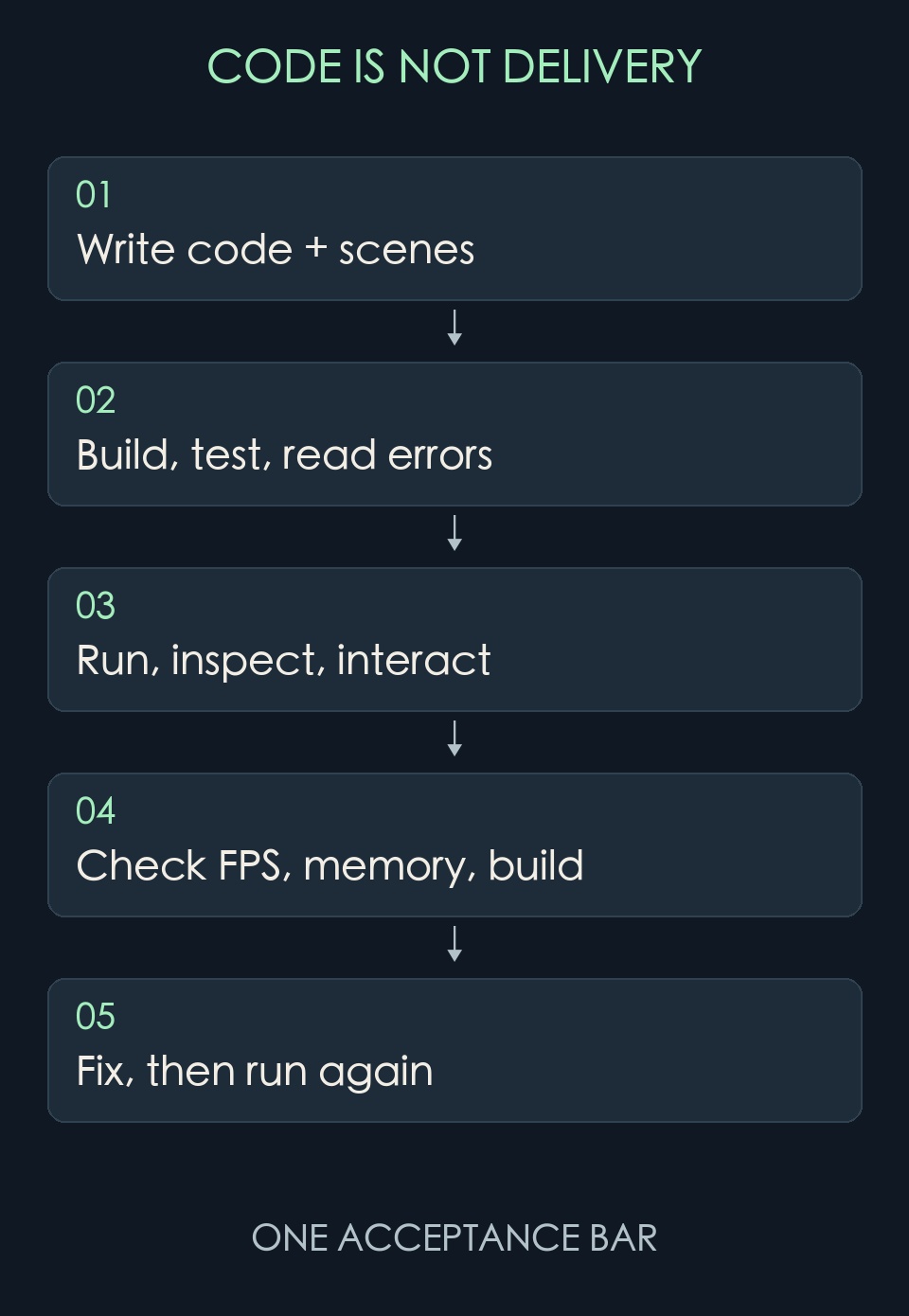
“Optimize my game” is not a reliable acceptance criterion. Optimization should be measured as changes in frame time, peak memory, loading time, and package size under the same scene, device, and build settings, with evidence that visuals and functionality have not regressed.
Unity, Unreal, and Godot each provide their own debugging and performance tools. Bevy and COCOS 4 can also connect to profiling and data-collection workflows. The decisive question is whether the current project can reliably provide AI with logs, profiler reports, and screenshots, then rerun the test under the same conditions. Without that loop, an engine cannot be said to optimize better merely because it calls itself “AI-first.”[3][5][11][19]
Practical usability also depends on how long each feedback cycle takes, whether failures are clear, whether changes can be rolled back, and whether scenes and assets can be reproduced. A simple tool that returns dependable errors is often more useful than a feature-rich assistant with opaque state.
In-Game AI: Inference Engines and Coding Assistants Are Different Products
Unity Inference Engine, formerly Sentis, imports and executes neural-network models. ML-Agents supports agent training and execution through reinforcement learning, imitation learning, and related methods. Unreal's NNE provides a unified access layer for different neural-network backends and is currently labeled beta. None of these products is the same as an editor chat assistant, and none guarantees a reliable LLM-powered NPC simply because it can be called.[20]
Godot, Bevy, and COCOS 4 projects can also integrate cloud models or local inference. The material reviewed here is not sufficient to confirm that they offer first-party general-purpose model-deployment stacks at the same level.
Runtime AI selection must also account for latency, cost, offline capability, model licensing, content safety, protections for minors, and a gameplay fallback when the network fails. Enemy pathfinding and behavior trees do not all need to become large language models simply because development has entered an “AI era.”
Commercial Advantages Must Be Counted at Every Delivery
A free engine can reduce licensing costs. A mature commercial engine can reduce the time spent building tools. A code-first engine can make automated testing easier while increasing the cost of collaboration for artists and level designers. These are different kinds of savings.
Godot offers stronger control over engine costs and code autonomy. Bevy gives technical teams more choice at the component level but assigns them more responsibility for building tools. Unity uses mature tools and services to shorten the path to commercial integration. Unreal's high-end production capabilities can reduce duplicated foundational work, while royalties and engineering complexity have to be included in the budget. If COCOS 4 succeeds in connecting API-based control, platform support, and visual delivery, it could reduce the friction of letting AI operate an editor. That potential cannot yet be booked as a realized benefit.
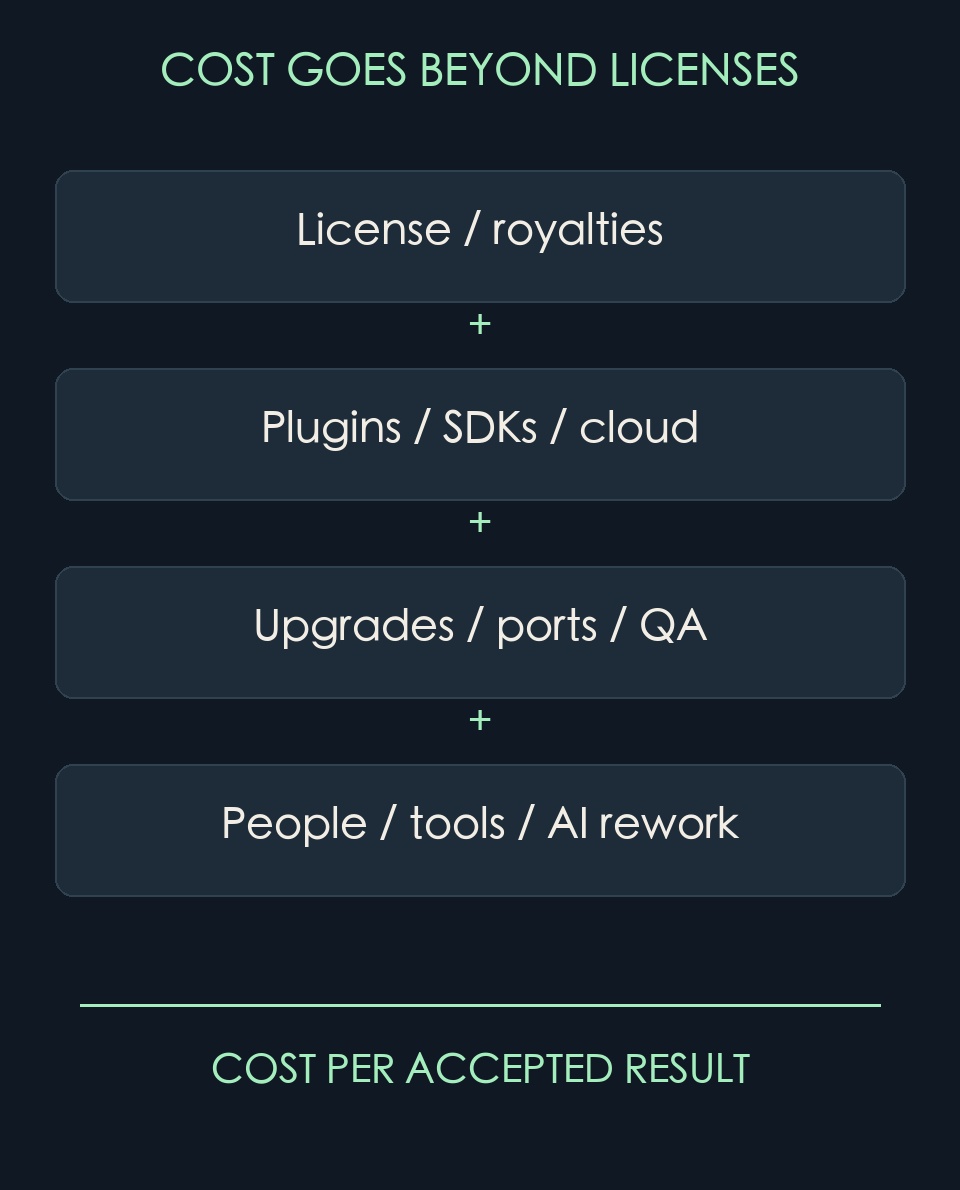
AI costs are not limited to tokens. They also include generated code that is rejected, repeated builds, incorrect assets, version migrations, and the human time required to restore a damaged project. The denominator in any comparison should be the number of results that pass the same acceptance criteria, not the number of lines generated.
For a Real Project, Choose with a Small Slice of the Actual Game
For a small team making an independent 2D game, I would begin by comparing Godot and Unity. Godot offers more direct licensing advantages and autonomy; Unity provides more complete commercial integration support. A team with experienced engineers should not migrate lightly because of one new AI plugin.
For a long-running mobile project, I would first verify the real delivery conditions of Unity and an existing mature Cocos workflow. COCOS 4 should be validated separately rather than inheriting a pass from the success of older versions. If the target is high-fidelity PC or console 3D, start by assessing Unreal's production pipeline. If the team is strong in Rust and the product is driven by simulation, data, and procedural content, Bevy deserves a serious prototype.
Whichever engines make the shortlist, have AI build the same representative slice of gameplay in each one: a character, collision, saving, UI, asset loading, and a build for the target platform. Then introduce an error deliberately and require the system to diagnose it, modify the project, run it, and submit evidence. If the project depends on commercial SDKs, include one real SDK in the test.
Track the number of human interventions, feedback time, undetected errors, performance regressions, and recovery cost. A toolchain that can reliably deliver that slice is more credible than a table awarding an engine an “AI compatibility score” of 9.5.
Sources and Verification Scope
[1] Official Godot showcases for Brotato, Dome Keeper, and Slay the Spire 2; the last is identified as early access. Source1 ; Source2 ; Source3
[2] Evil Empire, Brotato New Dawn update announcement, October 27, 2025; the 10 million figure refers to players across platforms. Source1
[3] Godot licensing, features, and console-support documentation. Source1 ; Source2 ; Source3
[4] Pounce Light's technical information for Tiny Glade and the official store page. Source1 ; Source2
[5] Bevy 0.20 announcement, README, and licensing. Source1 ; Source2
[6] Official Unity project case studies and corporate announcement. Source1 ; Source2 ; Source3
[7] Unity pricing and Runtime Fee cancellation announcement. Source1 ; Source2
[8] Official Unreal technical review of Fortnite and developer interview for Black Myth: Wukong. Source1 ; Source2
[9] Unreal licensing and EULA. Source1 ; Source2
[10] Epic Paper 2D documentation. Source1
[11] Official COCOS 4 and cocos-cli repositories, releases, and editor-separation documentation. Source1 ; Source2 ; Source3
[12] Cocos Creator family commercial cases appear in official Cocos developer case reports; they are not counted as evidence of games released with COCOS 4. Source1 ; Source2
[13] Official COCOS 4 product page. Source1
[14] COCOS 4 LICENSE and individual source files, plus the cocos-cli LICENSE/package.json; review against the locked commits. Source1 ; Source2 ; Source3
[15] Godot command-line, EditorPlugin, and engine unit-testing documentation. Source1 ; Source2 ; Source3
[16] Official Bevy examples for App testing and offscreen rendering. Source1 ; Source2
[17] Unity AI feature status and CLI/MCP migration documentation. Source1 ; Source2 ; Source3
[18] Epic documentation for Python editor scripting, automation tests, and the AI Assistant's release status. Source1 ; Source2 ; Source3
[19] Official documentation for Godot Profiler, Unity Profiler, and Unreal Insights. Source1 ; Source2 ; Source3
[20] Documentation for Unity Inference Engine, ML-Agents, and Unreal NNE. Source1 ; Source2 ; Source3
More from WayDigital
Continue through other published articles from the same publisher.
Comments
0 public responses
All visitors can read comments. Sign in to join the discussion.
Log in to comment